自定义声音
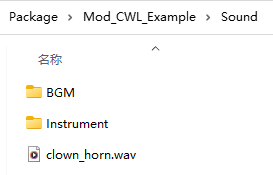
声音文件必须为 acc、mp3、ogg、wav 格式之一,文件名即为该声音的 ID。
元数据
首次使用该声音时,系统会自动生成默认的元数据 JSON 文件,您可以编辑此文件,在下次启动游戏时即可应用声音的元数据。
ID 前缀
Sound 文件夹中的子目录会作为 ID 的前缀。例如 AI_PlayMusic 会使用 Instrument/sound_id 这样的形式,因此如果您要替换乐器声音,应将声音文件放在 Instrument 文件夹内。
特殊前缀 BGM 会被实例化为 BGMData,详情请见此处。
替换游戏内声音
您可以使用相同的 ID 覆盖游戏内已有的声音。
例如,鸡的声音 ID 为 Animal/Chicken/chicken,如果您想替换它,只需在您的模组的 Sound/Animal/Chicken/ 文件夹内放入名为 chicken 的支持格式声音文件即可。
自定义文件夹
您也可以直接将文件放入 Custom 文件夹进行替换。
文件夹位置:
%localappdata%Low\Lafrontier\Elin\Custom\Sound\BGM游戏内打开方式:配置 → 其他 → 打开自定义文件夹。
在代码中使用
在游戏中可通过声音 ID 来播放声音。
cs
pc.PlaySound("clown_horn"); // <- Card.PlaySound
SE.PlaySound("clown_horn");