Elin BGM
Game comes with 100+ BGMs, they are defined by a numeric ID and sound file ID. You may check them out here:
BGM Player
If the player is not showing up, try refreshing the page.
We are still working on finding attributions for some materials. If you have any information, please let us know in Elona Discord.
Replace In-Game BGM
You can replace any background music in the game by placing audio files in the Custom BGM folder.
Custom Folder
Folder Location:
%localappdata%Low\Lafrontier\Elin\Custom\Sound\BGMIn-Game Access:
Config → Other → Open Custom Folder.
Naming Rules
Your files must begin with the corresponding BGM ID. The following names are all valid for BGM ID 56:
56.ogg56_myfav.ogg056.ogg056_battle_theme.ogg
MP3 and WAV formats are also accepted; for optimal memory usage and streaming loading, always prefer OGG.
056 orc01is the title menu BGM.
Add New BGM
Custom BGMs are placed in the mod's Sound/BGM sub folder, unlike custom sounds, you need to manually edit the id field in the metadata JSON. Be sure to launch game once to generate the JSON files first.
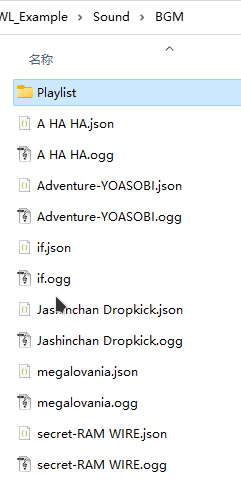
The id is an arbitrary number, set it to larger than what game uses and make it less likely to collide with other BGM's ID.
Important to note, this id is purely for the BGM. Your sound ID is still the file name without extension, e.g. BGM/MySoundFile
ID Override
You can also replace the existing BGM track by setting the id to its ID, for example, "id": 56 will replace 056 orc01.