
Mod Config
Every mod can have its own config page, opened from its row in the mod viewer. A BepInEx plugin gets one generated from its Config.Bind entries; a plugin can also implement IModConfig and lay the page out itself.
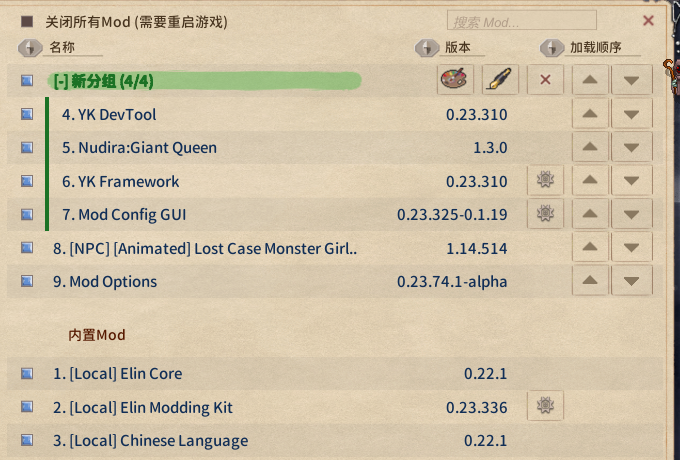
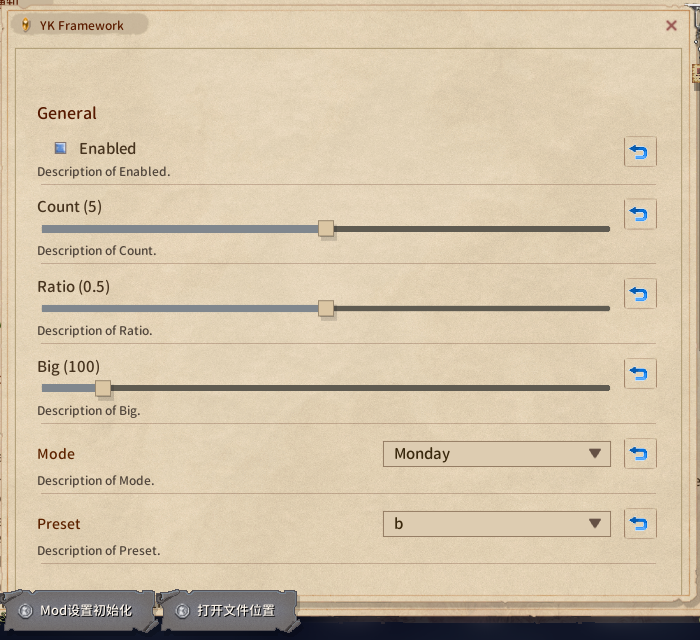
The generated page:
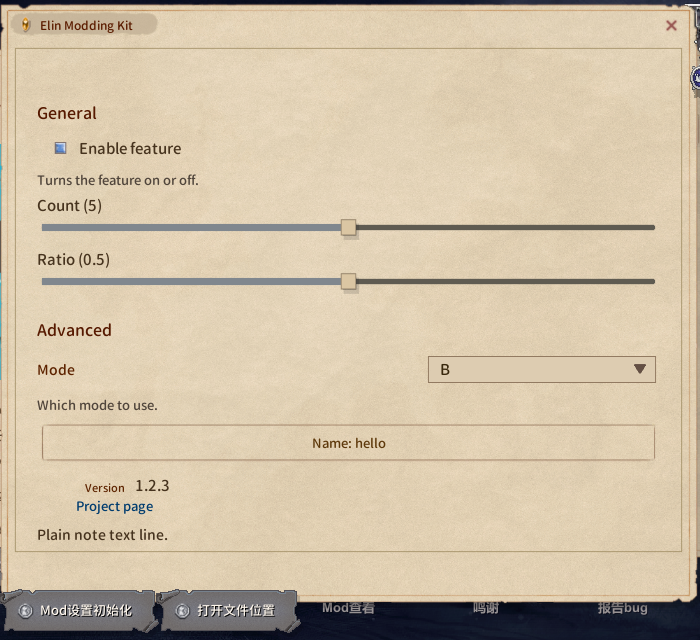
Your own layout: IModConfig
A plugin that implements IModConfig is no longer given the generated page. It builds its own in OnBuildConfig:
Extension (using EModding;) | What you get |
|---|---|
note.AddAll(Config) | the whole generated page, sections included |
note.Add(entry) | one entry, the widget picked by its type |
note.AddSlider(entry, min, max, label = null) | a slider over the range given here, whatever the entry declares; a value outside the range is shown clamped and left alone until dragged |
note.AddDropdown(entry, values, label = null) | a dropdown over these choices, for any entry type; a current value missing from the choices is listed first |
All of them read and write the entry directly and honour SaveOnConfigSet; labels go through Lang.Get. The page is rebuilt every time it is shown, so do not cache widget references; keep state that is not a ConfigEntry in your own fields and read and write it in the callbacks.
using System.Collections.Generic;
using BepInEx;
using BepInEx.Configuration;
using EModding;

[BepInPlugin("author.example", "Example", "1.0.0")]
public class ExamplePlugin : BaseUnityPlugin, IModConfig {
	public ConfigEntry<bool> enabled;
	public ConfigEntry<int> count;
	public ConfigEntry<string> preset;
	public string mode = "B", name = "hello";

	void Awake() {
		enabled = Config.Bind("General", "Enabled", true);
		count = Config.Bind("General", "Count", 5);
		preset = Config.Bind("General", "Preset", "b");
	}

	public void OnBuildConfig(UINote note) {
		note.AddHeader("General");
		note.Add(enabled);                                   // toggle
		note.AddSlider(count, 0, 100, "How many");           // slider, no AcceptableValueRange needed
		note.AddDropdown(preset, ["a", "b", "c"]); // fixed choices

		note.AddHeader("Advanced");

		// values that are not a ConfigEntry use the plain UINote methods
		var modes = ["A", "B", "C"];
		var dd = note.AddDropdown("Mode");
		dd.SetList(modes.IndexOf(mode), modes, (m, i) => m, (i, m) => mode = m, false);
		note.AddText("Which mode to use.", FontColor.Passive);

		UIButton b = null;
		b = note.AddButton("Name: " + name, () => Dialog.InputName("Name", name, (cancel, text) => {
			if (cancel) return;
			name = text;
			b.mainText.text = "Name: " + text;
		}, Dialog.InputType.Chat));

		note.AddTopic("Version", Info.Metadata.Version.ToString());
		note.AddButtonLink("Project page", "https://example.com/");
	}
}Only want a few things after the generated page? Write note.AddAll(Config); first, then append to it.
To have your own state take part in the reset button, add a delegate to the package's onResetConfig. The BepInEx entries are already wired (every entry in Config, drawn on the page or not), so handle only your own here:
void Start() {
	var pkg = ModUtil.FindFileProviderPackage(new FileInfo(Info.Location));
	if (pkg != null) {
        pkg.onResetConfig += () => mode = "B";
    }
}UINote cheat sheet
| Method | What you get |
|---|---|
AddHeader(string) / AddHeaderTopic(string) | section header (the one the generated page uses) / small heading |
AddToggle(string label, bool isOn, Action<bool>) | toggle, returns UIButton (interactable disables it) |
AddSlider(float value, Func<float,string> action, float min = 0, float max = 1, bool isInt = false) | slider; action writes the value and returns the label, and is also called once while building with the initial value clamped to the range; returns Slider |
AddDropdown(string label) | label on the left, dropdown on the right, returns UIDropdown; fill it with SetList(index, list, getName, onChange, notify: false) |
AddButton(string text, Action) | full-width button, returns UIButton |
AddText(string) / AddText(string, FontColor.Passive) | body text, wraps and grows; "NoteText_small" is a fixed 20px single line and overflows on more |
AddTopic(string label, string value) | label on the left, value on the right |
AddButtonLink(string text, string url) | link |
Space(int height) | empty row |
AddImage(Sprite) / AddPrefab(string path) | image / your own prefab |