
Prerequisites / Forewarning
WARNING
This tutorial is designed around Custom Whatever Loader. Ensure you have ONE of the two versions installed, not both! Please have the Custom Whatever Loader relative to what build you are designing of.
INFO
This tutorial is designed in the windows environment with a normal steam installation location (e.g. C:\Program Files (x86)\Steam\steamapps\common\Elin)
The Custom Whatever Loader is a powerful helper library that lets us simplify the addition of "stuff" into Elin via excel files.
Two of the things people want to add are their own Custom Class or Race.
You might also want to read these two articles to get an idea of the two sheets we are modifying are: SourceRaceSourceJob
Making your own basic Class or Race (Or Both!) via Custom Whatever Loader
Step 1: Setting up your basic mod skeleton. This will follow a lot of the steps listed in Basic Elin mod Package and this: Setting up script mods
Go to your elin install location. Go to Package Create a new folder, for this tutorial let's call it "Mod_MyCustomClassAndRace". If you plan on publishing this into steam, it is highly recommended that you come up with a more creative name. This is a tutorial and I'm lazy. In this folder, you will want multiple things for a CWL mod.
The package.xml file.
A package.xml describes the mod. Create a new text file in the mod folder and change its name and extension to package.xml:
Open it with an editor - not chrome/your browser, and fill in the following information:
<?xml version="1.0" encoding="utf-8"?>
<Meta>
  <title>My Custom Class and Race</title>
  <id>myname.customclassorracename.whateversuffixyouwant</id>
  <author>Me</author>
  <loadPriority>100</loadPriority>
  <version>0.23.50</version>
  <tags>Race, Class</tags>
  <description>
    My Custom CWL Class and-or Race!
  </description>
  <builtin>false</builtin>
</Meta>The LangMod folder + Source File.
CWL mod loads all the new data you want from xlsx files in a specific directory Create the "LangMod" folder in your package folder. In there, create an "EN" folder. In there, you will have your own Source xlsx file.
To save some hassle (because I have royally screwed this up before), I have uploaded a simple example sheet for you to use here
Download this xlsx file, move it into your LangMod/EN folder and rename it to whatever you want.
Updating the Source File
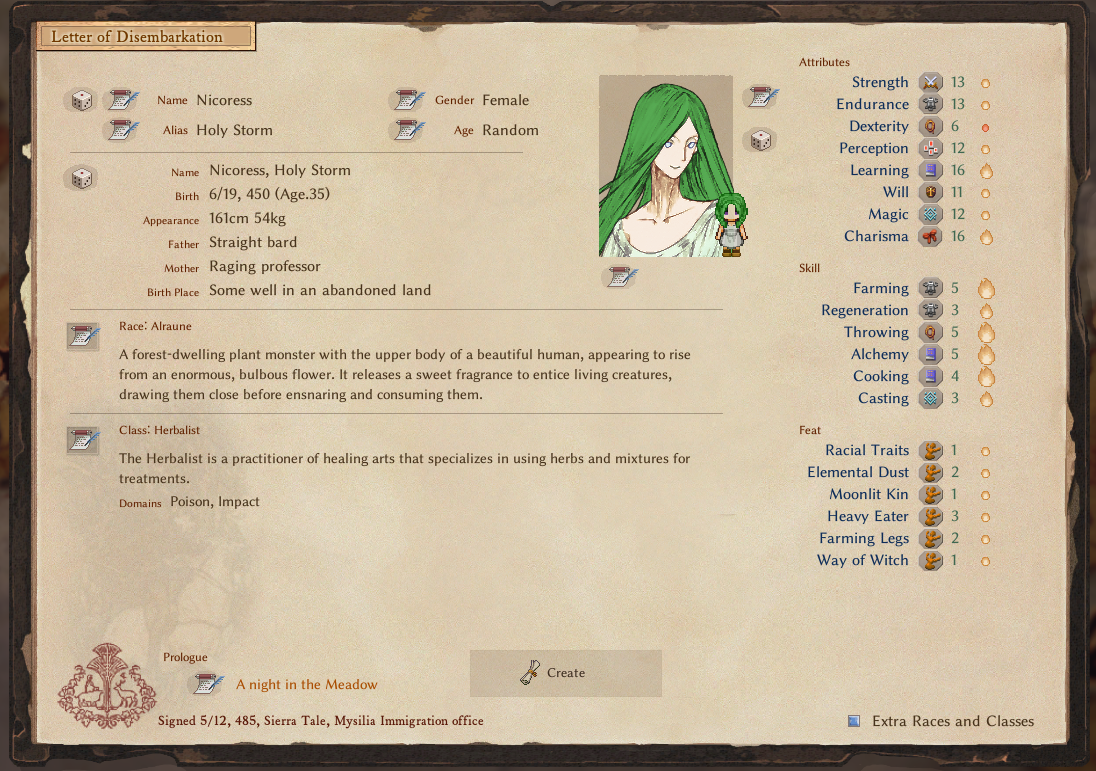
Using either Libreoffice or Microsoft Excel, open up the source file you downloaded and let's take a look at the contents. I have included an example race and class: The Alraune race, a plant monster that lures in prey to consume, and a class for them, the Herbalist job, as they specialize in flora.
For the Race, Alraunes have exceptional charisma, magic casting, and physical strength. However their suffering comes from the fact they don't exactly have legs... so to balance it I'll give them below the normal speed amount, 70. They're all about eating people, so Heavy eater 3 sounds good, as well as some all around magical resistances, so i'll steal Fairy Resistances 2 for them as well. Then to top it off, give them the Succubus feat to allow them to feed on people.
For the Job, the Herbalist is going to be like a mix of Farmer and Witch. So I took the farmer statline, and mixed both of the elements together to get their base skill setup. Make em poisonous, and part of the earth, so elePoison and eleImpact as their starting domains.
To get some of these elements, you'll want to look at existing files.
To get the vanilla races and classes:
Both the Race and Job sheets are stored here. Use the bottom to change sheets.
Element is kind of a master list of all the Attributes, Skills, Feats, and Spells in the game.
Add in some flavor text for details... The Herbalist is a practitioner of healing arts that specializes in using herbs and mixtures for treatments.
That's... about it?
That's all there is to it. Make sure you have CWL installed, load up your game, and see your new race!
Finishing touches
Add a preview.jpg file into your Mod Package. This will show up on the Steam Workshop when you upload it. Go in game, Mod Viewer, and you can publish your mod by finding your mod by left-clicking it and clicking Publish. Make sure in the Workshop you add ONE of the CWLs as a prerequisite mod!
Advanced Stuff
If you want your race/class to have custom feats or abilities, that will likely need some C# knowledge to code and add the new feat/abilities. That's somewhat out of scope for this basic tutorial though.